Turn WhatsApp into your Online Store
Showcase single or multiple products with interactive checkout buttons. Streamline checkout using a secure payment gateway and deliver personalized recommendations.
 Trendy ThreadsSummer edit · new pieces every week
 Sleeveless shiftBlack · cotton crepe₹1,299 +
 Linen shift dressSand · pure linen₹2,299 +
 Belted shirt dressTerracotta · cotton₹2,199 +
 Chambray shirtBlue · cotton₹1,499 + Summer edit3 items
Please check the order details and pay the amount.
Build Powerful Commerce Bots in Seconds
- We’ve automated a feature that allows customers to search for their desired products by simply sending a message.
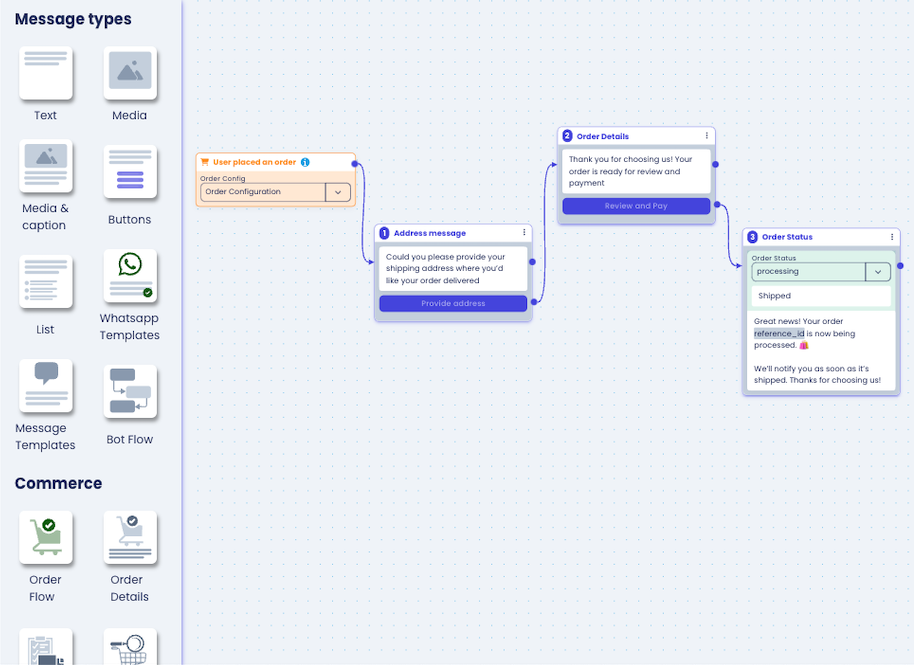
- Easily configure taxes, shipping costs, and discounts in one place and automate the checkout flow.
- Easily share products, catalogs, and offers with multiple customers.
Share Products With Customers
- Catalog: Offers a quick way to browse your entire catalog directly in WhatsApp with a single button or link.
- Single Products: Highlight a specific product with a detailed message and image.
- Multi-Product Lists: Showcase a selection of relevant products in a single message.
 Coffee & kitchen26 items
Hello! Here’s our coffee and kitchen range — order right here ☕
9:41 AM View itemsEffortless Ordering with Playbot Pro
- Share single or multiple products with checkout buttons, including taxes, discounts, and shipping costs.
- Collect shipping addresses or locations effortlessly
- Accept payments securely within WhatsApp for a seamless order completion.
 Creamy matte lipstick3 items
Please check the order details and pay the amount.
Seamless & Secure Meta In-Built Payments
- Accept secure payments directly within WhatsApp after users place their orders.
- Benefit from Meta's secure payment infrastructure, currently supporting Razorpay, PayU, and UPI
- Meta Currently Supports In-Built Payments for India & Singapore
 Eggless blueberry cupcake + 13 items
Please check the order details and pay the amount.
One-Stop Shop for Order Management
- Manage all your WhatsApp orders in one convenient location - the Order Panel.
- Update order status and send automated notifications to keep customers informed.
- Gain valuable insights into your sales performance with easy-to-use sales tracking tools.
 OrdersWhatsApp store
 #ER12345Sarah Davis · 2 items ● Processing Paid ₹1,640
 #DW3589Jessica M. · 5 items ● Pending Unpaid ₹3,290
 #HM8954Mary Harris · 3 items ● Processing Paid ₹4,450
 #EN89788Linda Taylor · 4 items ● Pending Pending ₹7,500
Engage Customers & Boost Sales
- Reach out to customers with targeted offers and recommendations through broadcast campaigns.
- Send multi-product messages, personalized catalogs, or special deals based on their preferences.
- Re-ordering previously ordered items. Allow them to easily reorder their favorite items.

Hello Chloe, check out our new arrivals ✨ Meet the Vitamin C glow serum and our new SPF 50 daily sunscreen.
9:41 AM Shop now
FAQ
Questions people ask about taking orders on WhatsApp
The way business owners ask them, answered in plain words.
-
Yes. They browse your catalog in the chat, add items to a cart, send the order and pay through a payment link with any UPI app or a card. You do not need a website or a separate shopping app.
Payments on WhatsApp -
Yes. Orders from retailers, dealers and regular customers arrive as proper orders with the items, quantities and total, and move through Unpaid, Need to ship and Shipped in one dashboard.
-
Yes. The invoice goes to the customer as a PDF in the same chat, and you can send the tracking number, courier slip or lorry receipt there when the parcel leaves.
Invoices on WhatsApp -
Shopify and WooCommerce stores connect to Playbot Pro, so order confirmations and abandoned-cart reminders go out on WhatsApp. The tracking number from ST Courier, Professional Courier, DTDC or any other courier, or the lorry receipt (LR copy) for a parcel lorry, is sent to the customer in the same chat when the order is dispatched.